


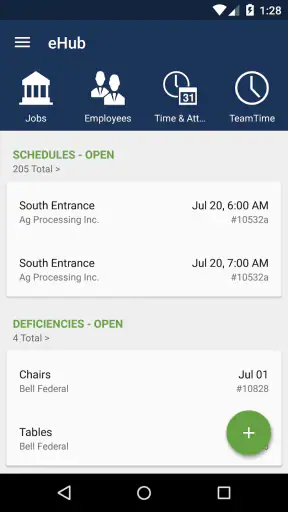
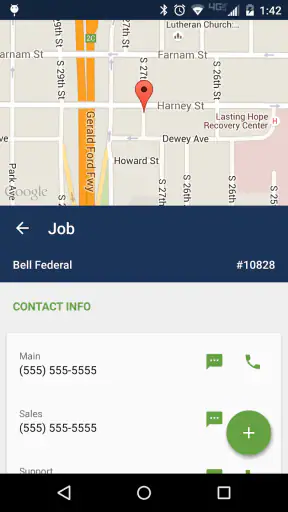
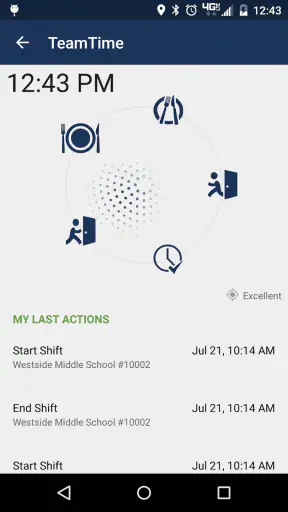
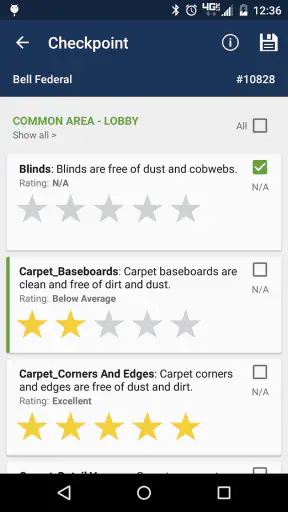
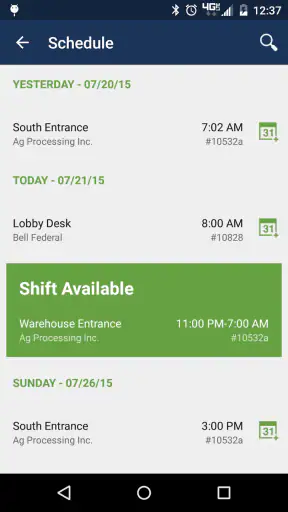
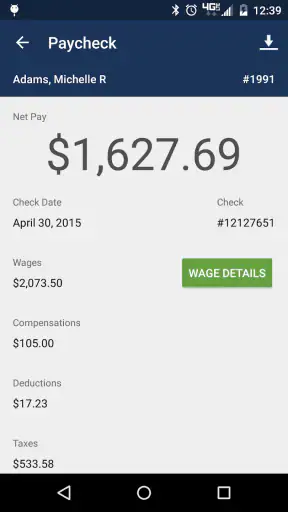
For employees and customers of building service companies and security contractors, the useful question is not whether an app looks impressive. It is whether it helps at the exact moment a work update, customer request, or account task needs attention. That is where eHub makes sense. Developed by TEAM Software, this free Business app is designed as a self-service point for people connected to those companies, rather than as a general office suite for everyone.
I found its appeal fairly practical: it puts work-related information and actions in a mobile setting, where people are more likely to need them while moving between sites, starting a shift, or checking something away from a desk. The experience depends heavily on having a working connection, so it is best understood as a connected doorway into an employer or contractor’s services, not as a replacement for every communication channel a workplace already uses.
How connectivity shapes the everyday experience
Useful when a task cannot wait for a desktop
The strongest case for eHub is the employee or customer who regularly deals with a company while away from a computer. A security officer may be preparing to begin a shift, a cleaner may be moving between buildings, or a customer may need to check a service-related matter during the day. In those situations, a phone is more convenient than waiting until someone reaches an office workstation.
That convenience is closely tied to connectivity. A self-service app can only show current account or work information when it can communicate with the service behind it. When the connection is stable, the process feels direct: open the app, complete the relevant task, and move on. When the signal is weak, the value changes quickly because the app becomes dependent on timing, location, and the quality of the mobile or Wi-Fi network available at that moment.
I would therefore avoid treating it like a notes app or a document viewer that can be relied on in every environment. Before leaving a strong connection, it is sensible to finish any important check or update that needs immediate confirmation. If a task is urgent, I would also keep the company’s normal contact route available instead of assuming the app alone will solve the issue.
A realistic mobile workday
Imagine an employee who starts the morning away from a desk. They open eHub before heading into a site, review the information available through their organization, and use the self-service functions that have been enabled for their role. Later, while traveling between locations, they try to repeat the process in an area with poor reception. The first interaction is convenient; the second may require patience or a return to a better-connected spot.
That contrast is important. The app’s mobile format is helpful precisely because work in building services and security is often distributed across locations. At the same time, the phone is not automatically a reliable network environment. A user should plan around that reality rather than blaming the app whenever connectivity interrupts the flow.
For customers, the same principle applies in a different way. A customer self-service tool is most useful when it reduces the need to call or email for routine matters. It is less suitable when the issue is complicated, urgent, or dependent on a conversation with a person. In those cases, the app can be a convenient first stop, but not necessarily the complete solution.
What the app is, and what it is not
eHub belongs in the category of workplace self-service apps. It is not presented as a universal productivity package, a team chat replacement, or a general task manager. Its audience is narrower and more specific: employees and customers connected to building service companies and security contractors.
That focus is a strength when your organization uses the relevant TEAM Software setup. The app has a clear reason to exist, and the mobile format matches the practical needs of people who may not sit at a desk. It is also a limitation for anyone looking for a standalone app that works independently of an employer, contractor, or service relationship. Downloading it does not by itself create useful access; the value comes from the organization and account context behind it.
This is one of the first questions I would answer before installing it: does my employer or service provider actually use eHub for my account? If the answer is no, the app is unlikely to become useful simply because it is free. That is a more important consideration than the store rating or install count.
Moving between mobile data and Wi-Fi
Connectivity can change several times during a normal shift. Wi-Fi may be dependable in one building but restricted or unavailable in another. Mobile data may work outdoors but become inconsistent inside large structures, basements, stairwells, or secured areas. Because eHub is intended for people connected to work and service organizations, these transitions are not unusual edge cases; they are part of the environment many users bring to it.
I recommend treating network changes as part of the workflow. If you need to complete something important, open the app when the signal indicator is healthy, allow the relevant screen to load fully, and avoid repeatedly tapping a control when the response is slow. Repeated attempts can create uncertainty about whether an action was accepted once or several times. Waiting for a clear result is safer than assuming every delayed tap failed.
A useful habit is to check the result before closing the app. If the screen has not visibly updated or the action has not produced a clear confirmation, I would not rely on it as completed. Instead, I would move to a stronger connection and try again, or use the organization’s established support route if the matter is time-sensitive.
Handling interruptions without losing confidence
Mobile interruptions are not limited to weak signal. A phone call, a low-power state, an accidental app switch, or a temporary change from Wi-Fi to mobile data can break concentration. The practical challenge is knowing what happened after returning to the app. Did the information load? Did the request go through? Is the screen showing current content or simply the last view that was available?
My approach is deliberately cautious. After an interruption, I would revisit the relevant screen rather than trusting memory. If the app appears stuck, I would give the connection a moment, then close and reopen it only when necessary. I would avoid using a forceful restart as the first response to every delay, because a slow network and a frozen application can look similar from the user’s perspective.
This matters especially for workplace records and customer-related requests. A person may be tempted to continue working from an old screen because it is already visible. That is where a small connectivity problem can become a practical mistake. If the information affects a shift, a service request, or a customer conversation, current confirmation is worth the extra few seconds.
Recovery when the network lets you down
The best recovery plan starts before the failure. If a task is important, I would avoid beginning it in a location where the phone is already struggling to load ordinary pages. I would also make sure I know how to contact the employer, supervisor, or service provider outside the app. That backup is not a criticism of eHub; it is sensible planning for any connected workplace tool.
When a request does not appear to complete, I would use a simple sequence:
Pause and check whether the phone still has a usable connection.
Return to the relevant screen and look for a visible change or confirmation.
Move to a stronger Wi-Fi or mobile-data location before trying again.
Keep a note of the time and the action if the matter affects work or customer service.
Contact the organization through its normal route if the issue remains unresolved.
The point of this routine is to prevent duplicate actions and unclear records. It is especially helpful for users who work under time pressure and may otherwise keep tapping while the network catches up. A calm check-and-confirm habit is more reliable than assuming that speed equals success.
Keeping data use sensible
Because eHub is used in mobile situations, some people will naturally be concerned about data consumption. I would not treat every screen as equally demanding, but I would still use ordinary data-saving habits: connect to trusted Wi-Fi when practical, avoid repeatedly refreshing a page that has not responded, and close the app when the task is finished rather than leaving it open unnecessarily.
These habits are useful for two reasons. They may reduce avoidable mobile-data use, and they also reduce confusion caused by repeated requests over an unstable connection. A user with a limited data plan should be particularly careful in areas where the phone keeps switching between weak Wi-Fi and mobile service. In that situation, a short, deliberate session is preferable to repeatedly reopening the same screen.
I would also avoid assuming that a screen visible on the phone is automatically current. If the connection has been unreliable, treat displayed information with appropriate caution and refresh only when the network is strong enough to respond clearly. This is a small but important distinction between reading something already on screen and verifying that it reflects the latest available information.
Who will get the most from it
eHub is a good fit for employees who need mobile access to their organization’s self-service environment and for customers whose building service or security contractor uses the platform. It makes particular sense for people who move around during the day, do not have continuous access to a desktop, and prefer handling routine matters from a phone.
It can also help users who want one recognizable place for company-related interactions instead of searching through old emails or relying on a browser shortcut. The benefit is not that it replaces every workplace system. The benefit is that a purpose-built mobile entry point can be easier to reach during a shift or while traveling between sites.
The audience rating is Everyone, which makes the app broadly approachable from an age-classification perspective. Still, suitability depends less on age than on account access and organizational use. A teenager downloading it without a connection to a participating employer or contractor would have little reason to keep it, while an adult employee may find it useful every day.
Who should choose another option
I would skip eHub if you are searching for a general business organizer, a personal time tracker, a project-management tool, or a universal customer-support app. Its value is tied to the specific employee and customer self-service role it serves. For broad collaboration, a team communication platform may be better. For complex customer problems, direct contact with a representative may be faster. For personal planning, a standard calendar or notes app will usually be more appropriate.
I would also be cautious if your work regularly takes you into places with no dependable connection and you need guaranteed access at the exact moment of action. A network-dependent tool can still be useful as part of the routine, but it should not be the only plan for urgent information or time-critical reporting. In that situation, your organization’s offline procedures or direct communication method may be more suitable.
How it compares with the usual alternatives
The closest alternative is often not another app but a web browser, email thread, phone call, or desktop portal. A browser can be more flexible when you need to move between several services, while email is better for a detailed explanation or a written conversation. A phone call remains the strongest option when the situation is urgent or difficult to describe through a self-service screen.
eHub’s advantage is focus. Instead of treating the organization as one more website among many, it gives connected employees and customers a dedicated mobile route. That can reduce friction for routine actions, particularly when the user already knows what they need to do. Its trade-off is narrower usefulness: it depends on the organization’s setup and may not offer the flexibility of a full browser or the human judgment of a call.
I would use it alongside those alternatives rather than viewing it as a winner-takes-all replacement. Use the app for straightforward self-service, a browser when a broader view is needed, and direct contact when the request needs explanation, urgency, or a decision from another person. That division of labor is more realistic than expecting one mobile tool to handle every workplace situation.
What the public response suggests
The app has an average rating of 4.2 from around 20 thousand ratings, with roughly 6.9 thousand written reviews, and it has passed one million installs. Those figures suggest that eHub has reached a substantial audience and that many users find it useful enough to rate. I would read them as signs of established use, not as a guarantee that every employee or customer will have the same experience.
Self-service apps are unusually dependent on the organization behind the account. A smooth experience can rely on correct access, current company information, and a reliable network, so a problem may feel like an app issue even when the underlying cause is elsewhere. That is why I would judge it in the context of your employer or service provider rather than by the rating alone.
Version, cost, and practical setup
The app is free, which removes the financial barrier to trying it. TEAM Software currently lists version 4.65.0, and the minimum operating-system requirement is 12. Before installing, I would check that the phone meets that requirement and that the organization has given you the access details or instructions needed to use the service.
The app has been available since October 24, 2011, so it is not a brand-new experiment. That history is useful for a business tool because it indicates a long-running product rather than a temporary utility. Even so, the current experience still depends on how your particular company has configured and adopted the service. A mature app cannot compensate for unclear internal instructions or poor network coverage at a worksite.
My connectivity verdict
I see eHub as a practical companion for the right employee or customer, especially someone who needs company-related self-service while away from a desk. Its biggest strength is the match between a mobile interface and work that happens across buildings, sites, and shifts. Its biggest limitation is equally clear: the experience depends on account context and connectivity, so it should not be treated as an independent offline safety net.
My recommendation is straightforward. Install it if your building service company or security contractor uses it, learn which routine tasks it handles, and test it in the places where you normally work. Build the habit of checking confirmations, retrying only after verifying the connection, and keeping a backup contact route for urgent matters. If that fits your day, the free app can remove useful friction. If you need a general business tool or guaranteed access without a network, another option will serve you better.


